Restaurant technology
What Is a Restaurant POS System and How Does It Work?
What a restaurant POS system does, how it differs from a cash register, on-premise, cloud and hybrid models, required hardware and six selection criteria.
UniPOS9 min read
When opening a restaurant, café or quick-service venue, the choice of a point-of-sale system is one of the first technical decisions. Owners typically raise the same questions. What is a restaurant POS system, how does it differ from a standard cash register, and is it necessary for the business? This guide explains how a POS operates during a shift, which types exist and what to verify before purchasing, with a focus on restaurants in Azerbaijan.
The guide is intended for new owners and for teams that still rely on paper tickets, a calculator and spreadsheets. In the final section we outline how UniPOS addresses each point.
In this guide
What is a POS system?
The traditional routine is familiar. A server writes the order on a notepad and takes it to the kitchen, where the handwriting is not always legible. As a result, an incorrect dish is occasionally prepared. At closing, the owner counts the cash drawer but cannot determine which dishes were profitable or what remains in stock. Who applied a discount, why an item was voided and which check was closed without payment often remain unclear.
A POS system records all of these operations. Every order, payment and action is stored in one database and is available as a report at any time. As a result, daily operations no longer depend on individual memory or paper records.
POS compared with a standard cash register
A standard cash register accepts an amount and prints a receipt. A restaurant POS also manages the floor plan, servers, kitchen printers, split checks, shifts, inventory and reporting. In Azerbaijan, fiscal receipts are issued through E-Kassa. When the POS is integrated with the fiscal device, the cashier does not need to re-enter amounts on a second machine.
The order cycle in a POS
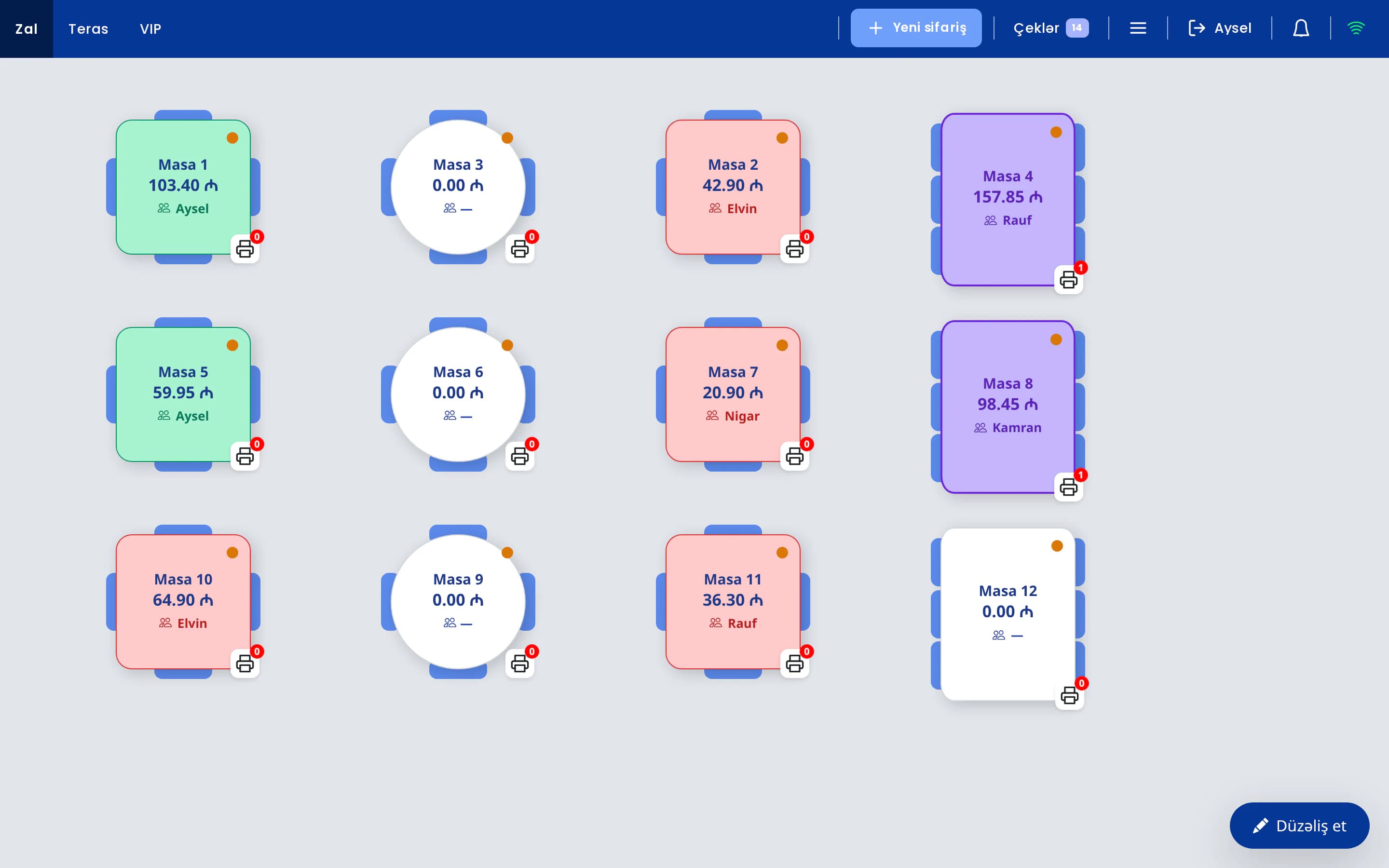
- Sign-in. The server signs in with a PIN or card and selects a table on the floor plan.
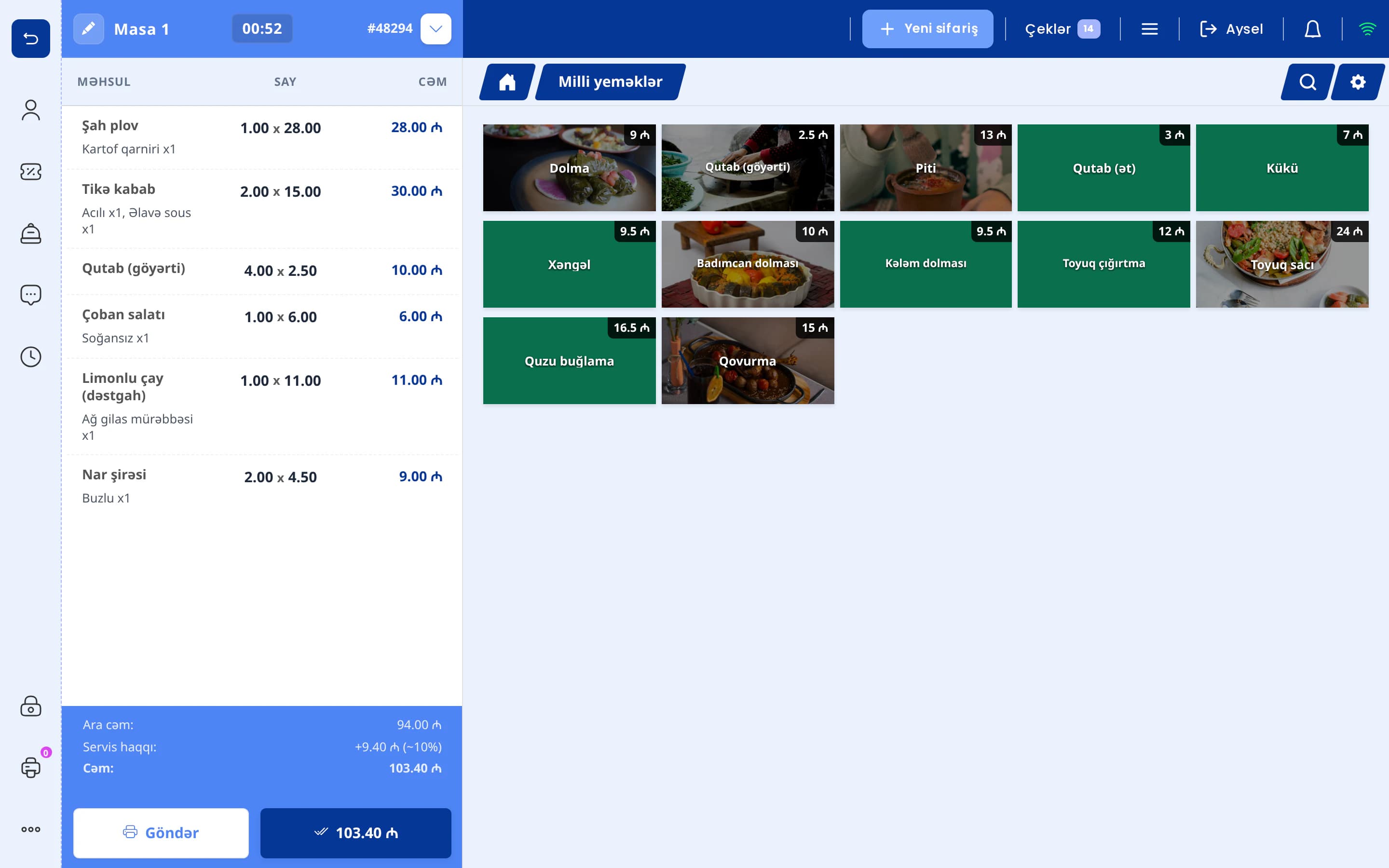
- Order entry. The order is entered on the terminal, a phone or a tablet: item, portion, modifiers (sauce, doneness, add-ons) and a note for the kitchen.
- Kitchen routing. Each item is sent to its station. Hot dishes go to the kitchen printer or kitchen display, drinks go to the bar.
- Bill. A pre-check is printed. If required, the check is split by item or two tables are merged.
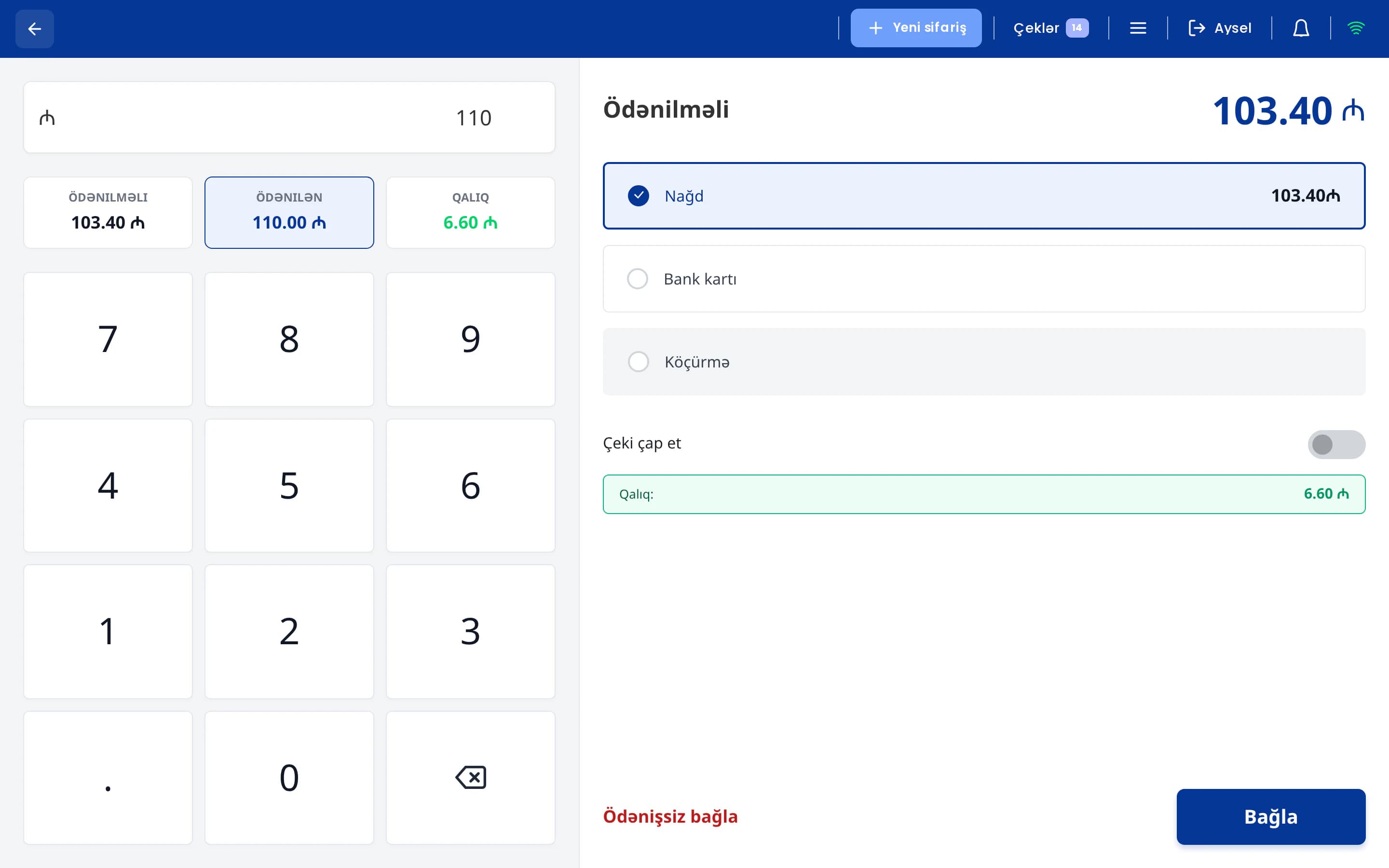
- Payment. The guest pays in cash, by card or with a combination of both. The fiscal receipt is issued through E-Kassa.
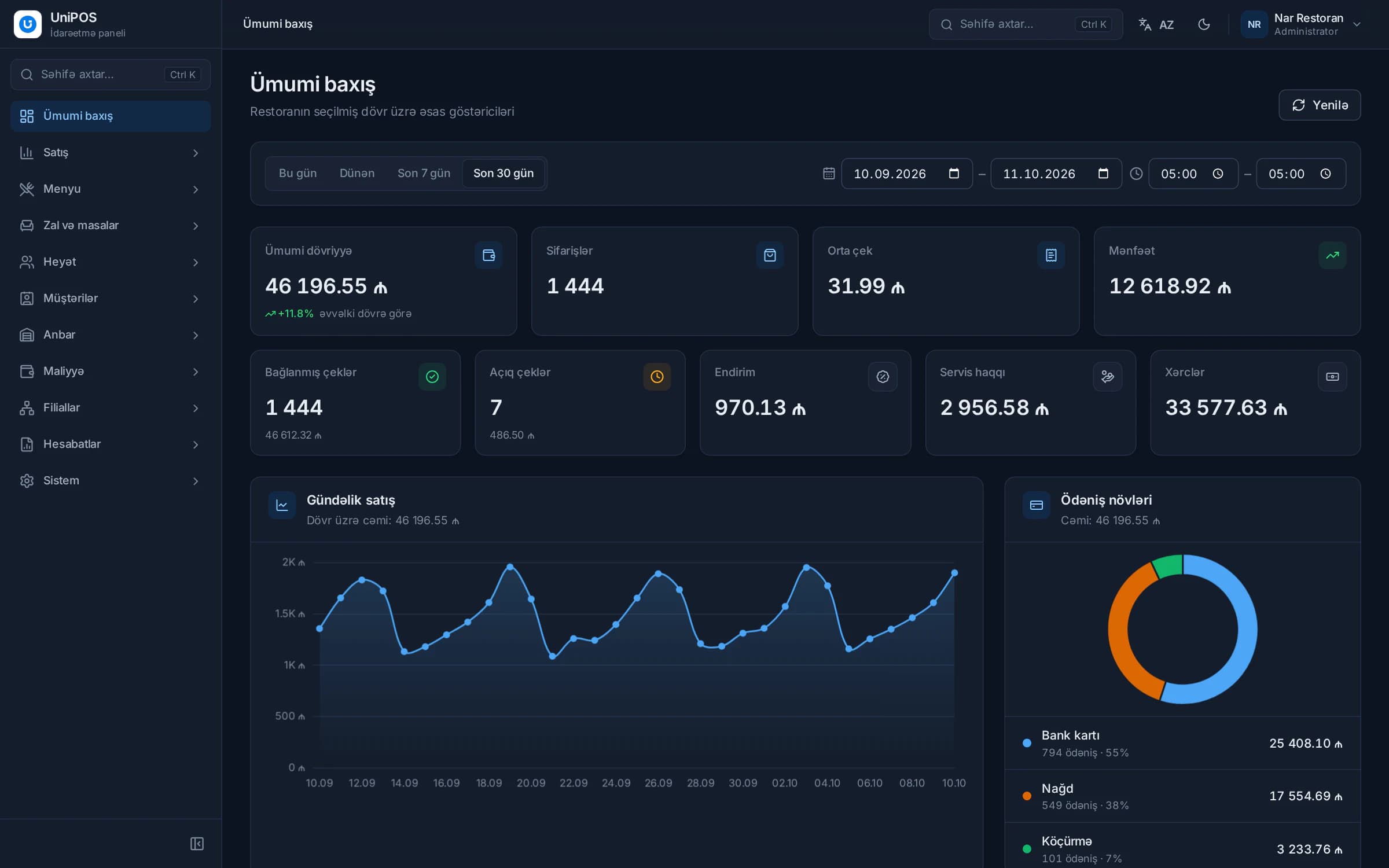
- Accounting. Recipes deduct ingredients from stock, the sale appears in reports and the owner can review it on a mobile device.
No data is entered twice. Information is recorded once and remains consistent across the system.
Core functions of a restaurant POS
On-premise, cloud and hybrid systems
Restaurant POS systems fall into three technical categories. The key differences are where the data is stored and how the system behaves when the internet connection is lost.
| Type | Operating principle | Advantages | Points to consider |
|---|---|---|---|
| On-premise | Software and data are stored on a computer at the venue. | Independent of the internet. | Remote monitoring is difficult. Backups and updates are the venue's responsibility. A hardware failure can lead to data loss. |
| Cloud-only | All data is stored on a remote server, and the terminal must remain online. | Remote access, automatic updates and backups. | Sales may stop when the connection is lost. |
| Hybrid (offline-first) | Data is stored on the POS computer at the venue and sent to the server when the internet is available. | Operates offline while still providing remote access and server backups. | The venue network (router, cabling) must be configured correctly. |
Internet outages are a practical risk in Azerbaijan, particularly in the regions, in shopping centres and in basement dining rooms. For this reason, the hybrid model is often the more reliable choice for restaurants. Terminals and server phones continue to operate over the restaurant's Wi-Fi network, and data is sent to the server once the connection is restored.
Required hardware
- POS terminal: a touchscreen PC or POS monoblock that runs the main application.
- Receipt printer for pre-checks and other documents.
- Kitchen and bar printers, or a kitchen display in their place.
- Fiscal register from an E-Kassa provider.
- Card terminal and cash drawer.
- Phones or tablets for servers.
- Router, network cabling and a UPS, so that a power or network interruption does not stop service.
A small café can begin with one terminal, one printer and a fiscal device, and add terminals and displays as the business grows.
The operational impact of a POS
1. Fewer order errors
The order is entered once, and the kitchen receives it exactly as recorded. Illegible notes and lost tickets are eliminated. Modifiers such as "no onions" are printed on a separate line.
2. Faster service
Servers send orders from the table instead of walking to the terminal, and the kitchen receives them immediately. During peak hours this shortens waiting times and increases table turnover.
3. Transparency of operations
Every void, discount and unpaid closure is logged with the employee, time and reason. Sensitive operations are permitted only for designated roles. This does not eliminate misuse entirely, but it makes it considerably harder and easier to detect.
4. Remote oversight
Sales, open checks, expenses and stock alerts are available on a mobile device. This is particularly important for owners who operate several locations or are not on site throughout the day.
5. Data-driven decisions
Reports identify dishes that sell well but generate little margin, the hours when the dining room is underused and the average check per server. Menu, pricing and staff schedules can then be adjusted on the basis of accurate figures.
6. Control of inventory and food cost
Recipes deduct ingredients for every portion sold. The difference between expected and actual stock indicates where losses occur. A detailed example is provided in our article on inventory and food cost.
7. Guest satisfaction
Dishes are served promptly and correctly, the QR menu shows photos and current prices, and checks are settled without delay. These factors contribute significantly to repeat visits.
Six selection criteria in Azerbaijan
- E-Kassa compatibility. Sales must be recorded through an online fiscal register. Confirm that the POS supports your provider and processes refunds and shift closing itself. Further details are available in our guide to E-Kassa for restaurants.
- Offline operation. Confirm whether orders, payments and kitchen printing continue without internet access, and how data is synchronised afterwards.
- Ease of training. Staff should work in a language they know well. Large buttons and short workflows reduce training time.
- Implementation and support. Clarify who loads the menu, connects the printers and trains staff, and whom you contact when an issue arises during service.
- A single system. The waiter app, kitchen display, QR menu, inventory and owner app should share one database rather than be connected as separate products.
- Total annual cost. Add up the licence or subscription, implementation, additional terminals and paid add-ons for at least one year.
A more detailed checklist is available in our article 10 things to check when choosing a restaurant POS.
How UniPOS applies these principles
UniPOS is a restaurant management system developed in Baku. It addresses the criteria above as follows:
- POS application for Windows: floor plan, modifiers, split and merge checks, payment split across two methods, refunds, shifts and in-POS reports.
- Offline operation: data is stored on the POS computer at the venue and sent to the server automatically when the internet is available. The number of pending operations is shown on screen.
- Waiter app: the same POS interface on Android and iOS phones and tablets, connected to the main terminal over the restaurant network.
- Kitchen display and kitchen printers (USB, COM, LAN), with routing by category or item.
- E-Kassa integration with Omnitech, Sunmi/Caspos, OneClick/Vizar, DataPay and AzSmart/SmartOne.
- QR menu: guests scan the QR code on their table and place an order. Depending on the venue's settings, the order is added directly to that table's check or arrives in the POS for staff to accept or reject. Payment is made at the venue.
- Back office for inventory, recipes, stock counts, finance and multiple locations, together with the UniPOS Manager app for Android with push notifications.
- Control: PIN or RFID/NFC sign-in, more than 40 POS permissions, an operation history and a suspicious-actions log.
UniPOS Manager also offers an AI assistant, available as a separately enabled module. Owners can ask questions about sales, stock levels and expenses by text or by voice, for example "Which items are running low?". The assistant is read-only: it analyses and explains the data but does not change anything in the system. In addition, a Telegram briefing with key figures, items that require attention and a recommendation can be delivered every morning and at the end of the day.
A POS system should be assessed not by the number of its features, but by how well it supports staff during the busiest hours.
A UniPOS presentation based on your menu
Request a demo, and we will present UniPOS in line with your restaurant's workflow and answer your questions.
Book a free demoConclusion
A restaurant can be operated with paper records, but losses, misuse and the true profitability of individual dishes then remain outside management's control. A well-chosen POS reduces order errors, accelerates service and records every operation. Inventory and food cost remain under control, and decisions are based on accurate figures.
Do not rely on a feature list alone. Evaluate the system live with your own menu and workflow, and ask your cashier, servers and chef for their assessment, as they will use it every day.