Restaurant management
Restaurant Management System Guide with a Rollout Plan
What a restaurant management system is, which modules it includes and how one order moves through it, plus offline mode, a rollout plan and common mistakes.
UniPOS12 min read
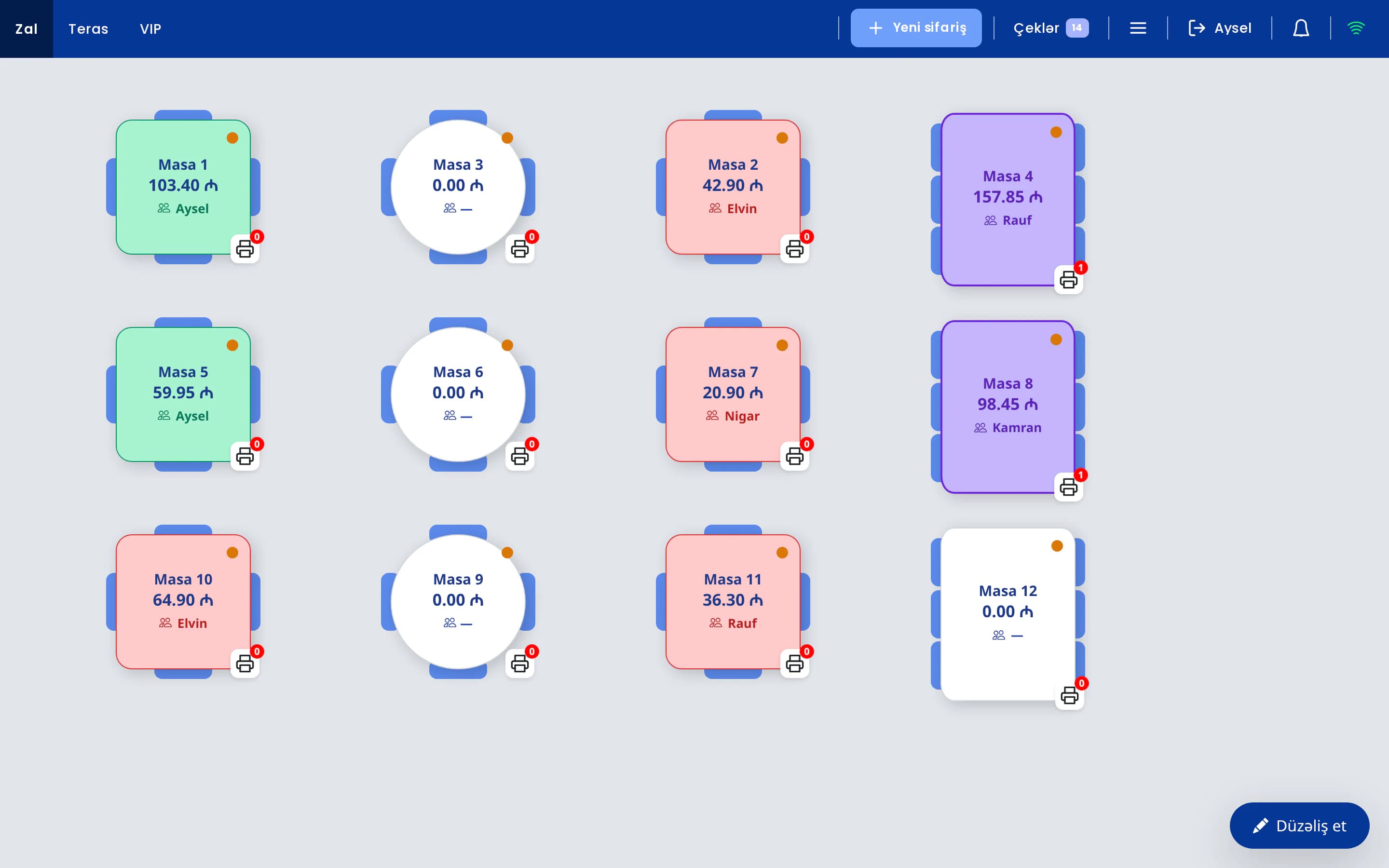
A restaurant management system brings the daily work of a venue into one set of software: the register, the waiters, the kitchen, inventory, finance and reporting. A cash register only records payments. A management system follows every stage, from the moment an order is taken to the profit figure at the end of the month. This article explains which parts such a system consists of, how data moves through it on a single order, and in what order a venue should introduce it.
The basics of point of sale software are covered in what is a restaurant POS system, and vendor selection criteria in 10 criteria for choosing a restaurant POS. We don't repeat those topics here. This guide focuses on how the system is structured, how the modules connect and how the rollout works.
Contents
- What a restaurant management system is
- Modules and who uses them
- How one order moves through the system
- Signs you have outgrown paper, Excel and a basic register
- One integrated system or separate programs
- What happens when the internet goes down
- A step-by-step rollout plan
- Common rollout mistakes
- Requirements by type of venue
- How UniPOS is structured
What a restaurant management system is
A restaurant management system is software that connects the work done at the point of sale, in the kitchen, in the storeroom and in the office through one shared database. The cashier, waiters, cooks, stock keeper, accountant and owner work on different screens, but they all see the same data. A check closed at the register shows up with the same figures in stock levels, in the profit report and on the owner's phone.
It helps to separate this from related terms, because vendors often use them interchangeably:
| Tool | What it does | What it doesn't do |
|---|---|---|
| Cash register (fiscal device) | Takes the amount and prints a fiscal receipt. | Knows nothing about tables, the kitchen, stock or reports. |
| Standalone POS software | Table map, orders, check operations, payments and shifts. | Inventory, food cost and finance are often kept in another program or in Excel. |
| Restaurant management system | Sales, kitchen, inventory, finance, staff, customers and reports in one database. | Usually doesn't fully replace statutory accounting software or tax filing. |
Put simply, the POS is the sales part of a management system. For a small coffee shop, POS software may be enough at the start. Once the menu grows, the storeroom gets bigger and the owner isn't on site every day, sales data needs to be connected with inventory and finance. That stage is what people usually mean by "restaurant automation" or "restaurant back office software".
A management system also turns the venue's rules into settings. Who may give a discount, which ingredients go into a dish, which category prints on which printer: each of these is defined once in the system. After that the rules no longer depend on anyone's memory, and they don't change when a new employee joins.
Restaurant management system modules and who uses them
Module names vary between vendors, but the functional structure is similar. The table below shows who works with each module and which problem it removes.
| Module | Who uses it | Problem it solves |
|---|---|---|
| Register (POS) | Cashier, manager | Table map, orders, check splitting, payment and shifts on one screen. Nobody adds up bills on a calculator. |
| Waiter app | Waiters | Orders are entered on a phone at the table. Waiters don't have to walk to the register for every order. |
| Kitchen display and printers | Cooks, bartender | Each order reaches the right station: hot dishes to the kitchen, drinks to the bar. No more unreadable handwriting or lost tickets. |
| Inventory and recipe cards | Stock keeper, head chef | Ingredients of each sold dish are deducted from stock by its recipe card. Stock levels, losses and food cost become visible. |
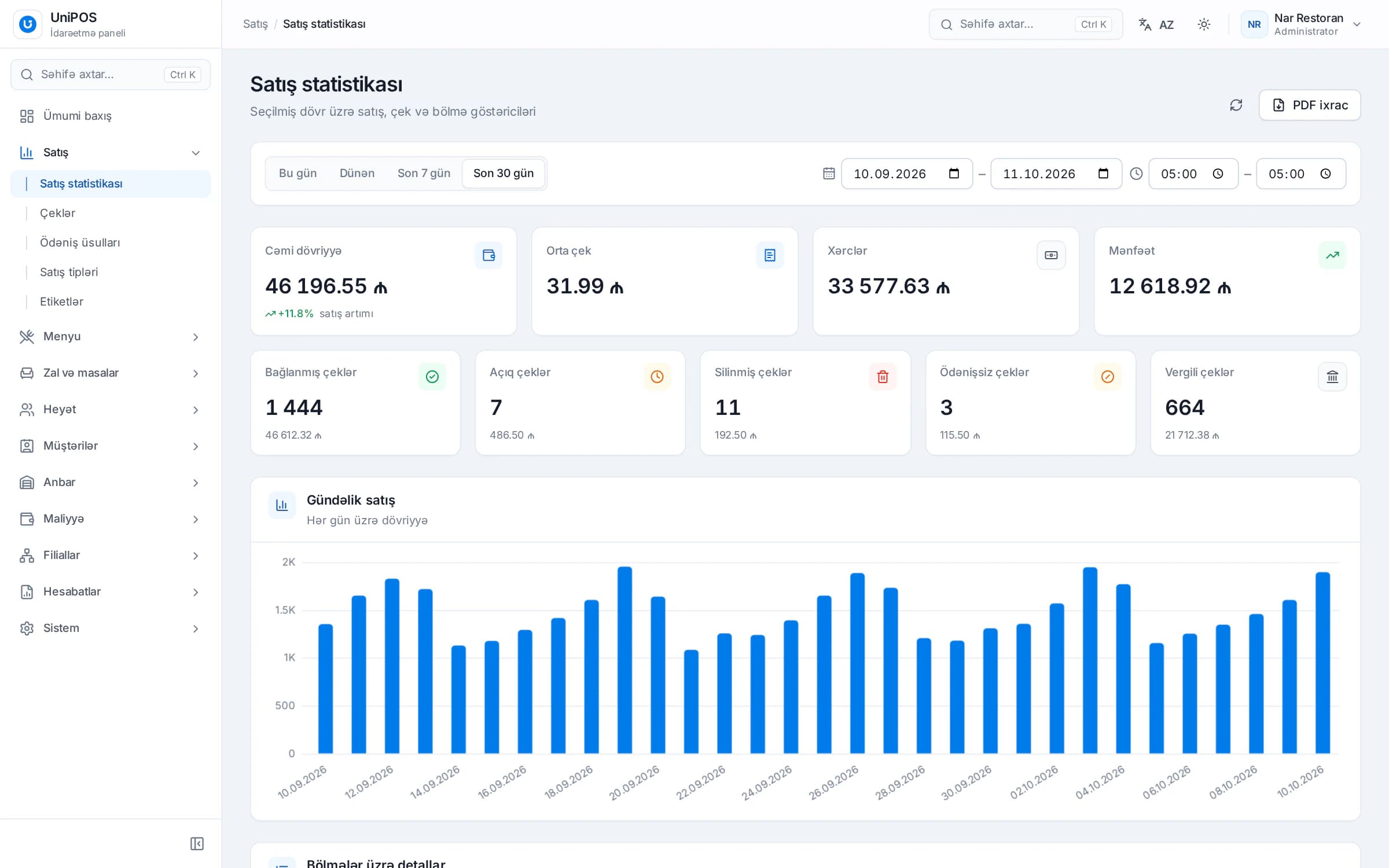
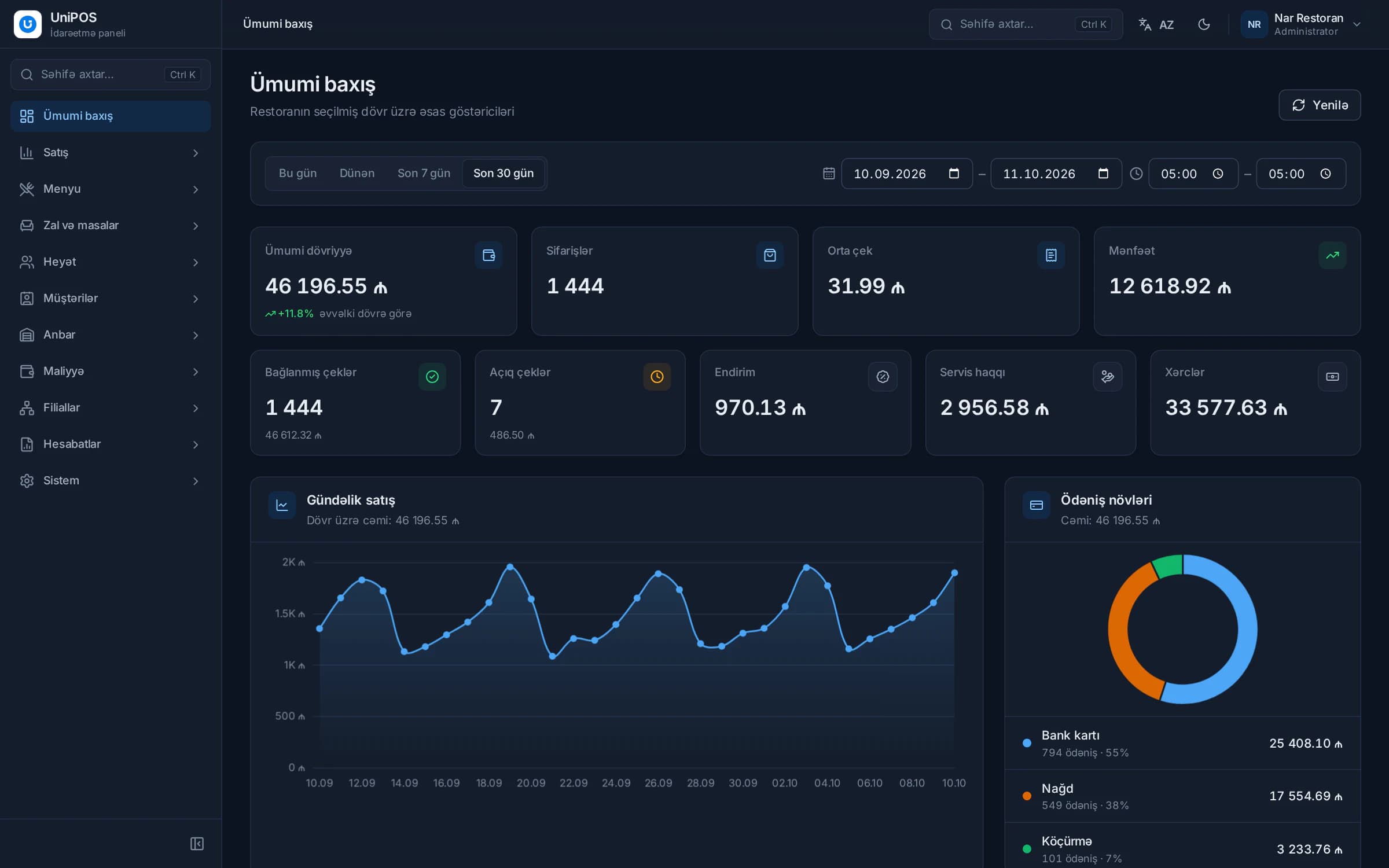
| Back office: reports and finance | Owner, manager, accountant | Sales, expenses, profit, cash accounts and supplier debts in one place. No more merging several spreadsheets. |
| Owner's mobile app | Owner, management | Sales, open checks and deletions can be followed from outside the venue. |
| QR menu | Guests | Guests open the menu on their phone and order from the QR code on their table. Price changes don't require reprinting menus. |
| Fiscal integration (E-Kassa) | Cashier | The fiscal receipt prints from the POS. The amount isn't typed into a second device. |
| Customer base (CRM) | Cashier, manager | Regular guests, delivery addresses and group discounts are recorded. |
| Staff and permissions | Owner, manager | Each employee signs in with a personal PIN. Discounts, deletions and refunds are limited to people with the right permission. |
| Multi-branch management | Group management | Sales, menus and transfers of several branches are visible in one account. |
Not every venue needs every module on day one. A single-room cafe works fine without the branch module, and a fast food counter may never use a waiter app. What matters is that all modules share one database. A module you add later should work with the existing menu, staff and sales data right away. Otherwise you end up entering everything again.
How one order moves through a restaurant management system
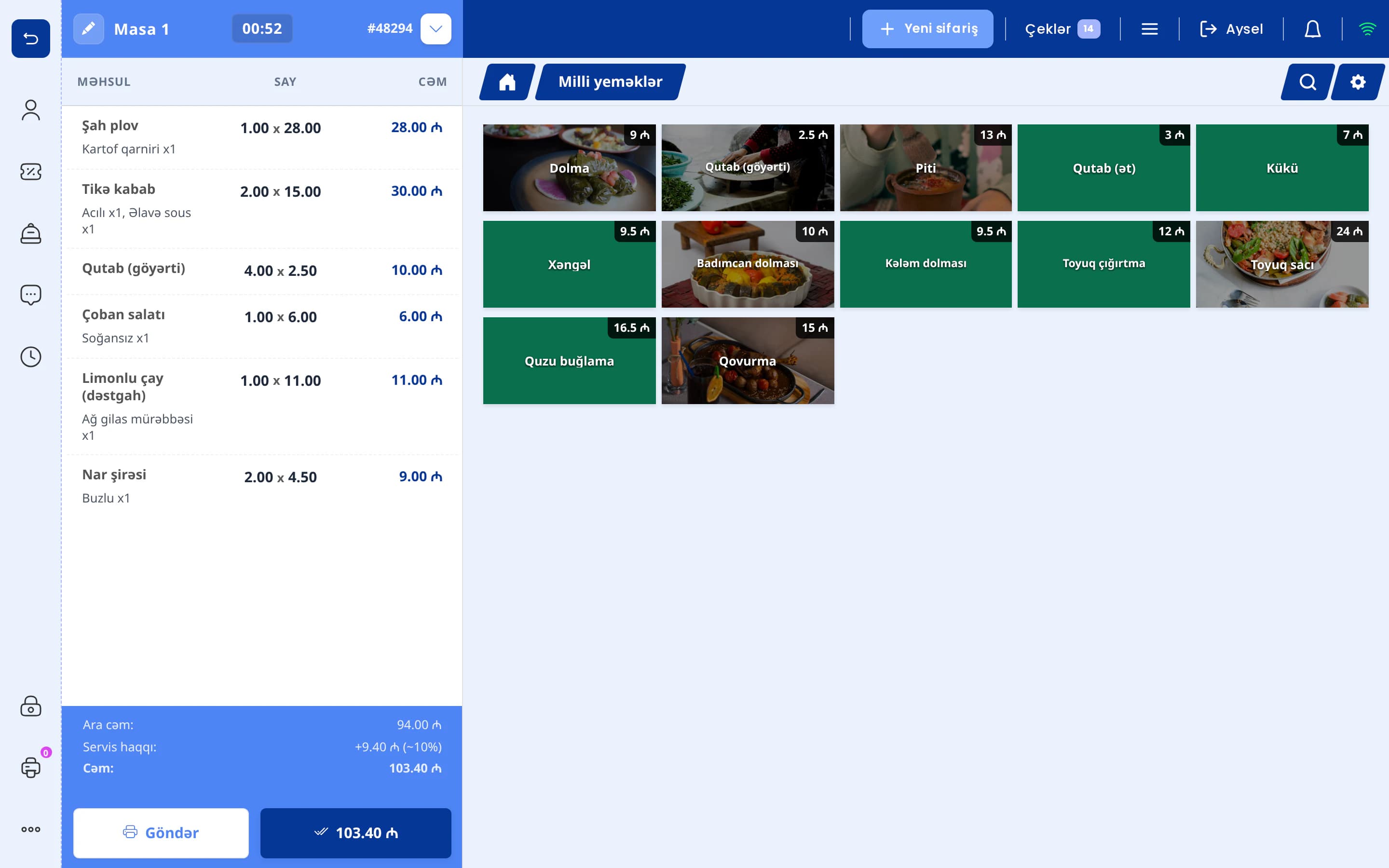
The easiest way to understand the system is to follow a single table. Say a table of four orders two chicken kebabs, a salad and a pot of tea.
- Taking the order. The waiter enters the order on a phone at the table. Alternatively, a guest scans the QR code on the table and orders directly. Depending on the venue's setting, that order either goes straight onto the table's check or waits at the register for staff to accept it.
- Kitchen and bar. The kebabs and salad go to the kitchen printer or kitchen display, the tea goes to the bar printer. The cook sees notes like "no onion" on a separate line.
- Bill and payment. When the guests ask for the bill, a pre-check is printed. Payment is taken in cash, by card or split across two methods, and the fiscal receipt is issued through the fiscal device.
- Stock deduction. The ingredients of the dishes sold are deducted from stock according to their recipe cards: chicken, onion, tomato, flatbread, tea. The stock keeper doesn't write any of this down by hand.
- Reports. The sale appears in reports by product, category, dining room, waiter and payment type. Because the cost of every dish is known, profit is calculated too.
- The owner's phone. The owner sees the day's revenue, open checks and deletions in the mobile app, and gets a notification when a check is deleted or refunded.
In this chain, data is entered once, when the order is taken. Every later step reuses it. In a venue running separate programs, the same sale gets written down three or four times: at the register, in a stock spreadsheet, in a finance file. Each extra entry is another chance for an error, and at month end the numbers don't match.
Signs you have outgrown paper, Excel and a basic register
Many venues spend their first years with a notepad, a calculator, Excel and a fiscal register. At low volume that works. If the following situations keep coming back, your operations have outgrown those tools:
- The cash at the end of the day doesn't match the sales records, and you can't find out why.
- The kitchen misreads handwriting, and dishes go to the wrong table or get forgotten.
- You only roughly know which dishes make money and which lose it.
- Every stock count shows an unexpected shortage, but it's unclear which product it comes from.
- You can't tell afterwards who gave a discount, comped an item or deleted something from a check.
- Month-end reporting means merging several spreadsheets by hand.
- On days you're away, the only way to know how sales are going is to call someone.
- You're planning a second location, but the numbers for the first one are still scattered.
If several of these sound familiar, the problem is usually the tools, not the people. As long as records live in different places, control depends on individual employees paying attention. A management system pulls those records together and stores every action with the name of the person and the time.
One integrated system or separate programs from different vendors
Some venues buy POS software from one company, an inventory program from another and a QR menu from a third. Each program can work well on its own. The trouble starts at the connections between them.
| Criterion | Integrated system | Programs from different vendors |
|---|---|---|
| Menu and prices | Changed in one place. The POS and QR menu show the same price. | Updated separately in each program, so prices can drift apart. |
| Stock deduction | Driven by sales. | Sales data has to be exported and imported, sometimes retyped by hand. |
| Reports | Sales, expenses and food cost in one report. | Numbers are collected from different files. |
| Support | One point of contact. | When something breaks, vendors may point at each other. |
| Staff training | One interface logic. | Each program has its own rules and login. |
| Updates | Modules are updated together. | Updating one program can break the link to another. |
Separate programs can have advantages, such as deeper features in one area or keeping a tool your team already knows. If you go that way, check in the demo whether data is passed between programs automatically or copied by hand. For a restaurant, the critical link is between sales and inventory. If that link is manual, food cost figures stop being reliable very quickly.
How a restaurant management system works when the internet goes down
Part of a management system runs over the internet: the back office, the owner's mobile app and the QR menu. Sales, however, happen inside the venue and shouldn't depend on the internet. That's why data is kept on the venue's own register computer. The register, waiter phones and kitchen printers talk to each other over the restaurant's Wi-Fi network.
When the internet drops, order taking, kitchen printing and payments carry on. When it comes back, the stored data is sent to the server automatically, and sales appear in the back office and on the owner's phone. In the meantime it's important to know what hasn't been sent yet, so the system should show the number of operations waiting to be uploaded.
Keep one thing in mind. Without internet, the remote parts update with a delay. A QR order travels from the guest's phone over the internet, so that channel depends on connectivity. How the fiscal device and the card terminal behave offline is set by the fiscal provider's and the bank's rules. Clarify these points before rollout. For more on the fiscal side, see how E-Kassa works with a restaurant POS.
A step-by-step plan for restaurant automation
Rolling out a system doesn't end with installing the software. The result depends mostly on how accurately the initial data is entered and how well the staff are prepared. The sequence below suits most venues.
- Menu and recipe cards. Enter categories, products, portions and modifiers. Build a recipe card for every dish: ingredients, gross weight, unit of measure. Set up sauces, doughs and other components used in several dishes as semi-finished items. This step takes the longest, but inventory and food cost depend on it. More detail: restaurant inventory and food cost.
- Staff and permissions. Create a personal login for every employee. Define roles: cashier, waiter, manager, stock keeper, accountant. Give the right to discount, delete checks, refund and comp items only to the people who need it.
- Dining rooms and tables. Set up rooms such as the main hall, terrace and private room, with tables matching the real layout. If you charge a service fee, a deposit or an hourly rate, configure it at this stage.
- Printers and hardware. Connect the kitchen and bar printers and decide which category prints where. Test the fiscal device, card terminal and waiter phones. The router and UPS belong on this list too.
- Opening stock count. Before going live, count what's in the storeroom and enter the opening balances. If the starting balance is wrong, every stock report for the first month will be wrong too.
- Trial day. Run a test shift before real service. Have staff enter test orders, print kitchen tickets, split checks and take payments. Switch the router off for a few minutes to test offline operation. Decide in advance how test sales will be kept out of your real reports.
- First month review. At month end, run a stock count and compare actual stock with what the system expects. A big gap often means the recipe cards don't match the real recipes. Review the deletion, discount and comp reports and adjust permissions if needed.
Practical tip. Go live on a quiet weekday, not right before your busiest day. When staff can enter their first orders without pressure, there are fewer mistakes and questions get answered in time.
Common mistakes when rolling out restaurant software
- Postponing recipe cards. "Let's start with the register and set up inventory later" usually means inventory never gets set up. At least build cards for dishes with expensive ingredients from day one.
- One login for everyone. In a team sharing a single PIN, the action log tells you nothing. Control starts with personal logins.
- Keeping the old method in parallel. When the notepad and the system run side by side, staff drift back to what they know and the data stays incomplete. Set a switchover date and use only the system from that day on.
- Leaving managers out of training. Waiters and cashiers get trained, but nobody knows how to process a refund, close a shift or read the reports. Every shift needs at least one person who can.
- Not testing printer routing. If desserts print in the kitchen and salads at the bar, the first busy evening turns into chaos. Test each category separately on the trial day.
- Not looking at the reports. The system collects data, but if nobody analyses it, nothing changes. Make a weekly review of the key figures a habit. Which figures to watch is explained in restaurant reports and key metrics.
Restaurant management software requirements by type of venue
The core modules are the same everywhere, but each format has its own priorities:
- Restaurants. Table map, waiter app, kitchen and bar printers, check splitting, service fee. With a large menu, recipe cards and food cost matter most here.
- Cafes and coffee shops. Fast sales at the counter, modifiers (milk type, syrup, size), takeaway. Stock control for raw materials such as coffee beans and milk.
- Fast food. Quick ordering at the counter, sale types (dine-in, takeaway, delivery) and a kitchen display. A customer-facing display next to the register can also help.
- Bars and lounges. Deposits and minimum spend, tabs that stay open for hours, accurate stock control for spirits. Hourly billing for hookah tables.
- Entertainment venues. Timers and hourly rates for billiards, PlayStation and other zones, with food and drinks on the same check.
- Hotels. Charging restaurant sales to the room, plus rooms, bookings and folios.
Groups with several branches have extra needs: copying the menu to other branches, transfers between branches and a combined report for all locations. Taking these into account when choosing a system for the first branch costs far less than switching systems later.
How UniPOS works as a restaurant management system
UniPOS is a restaurant management system developed in Baku. The modules described above are built not as separate programs but as a product family sharing one database. A short overview of all modules is on the home page.
Sales don't stop when the internet goes down: data is kept on the register computer itself and sent to the server automatically once the connection is back. Reports, finance and inventory are handled in the back office, so the cashier only deals with sales. In the QR menu, guests order from the QR code on their table, and depending on the venue's setting the order goes straight onto the table's check or is accepted at the register. Venues with several branches can copy the menu to other locations and record transfers between branches in the same back office.
The UniPOS Manager app also offers an AI assistant as a separately enabled module. It answers typed or spoken questions about sales, stock levels and expenses based on the venue's real data, but it never changes any data.
Limitations. UniPOS has no direct integration with delivery platforms. Such orders are entered at the POS with the "Delivery" sale type. The QR menu has no online payment, and the guest interface is currently available in Azerbaijani only. UniPOS Manager is available for Android only.
Map out the right setup for your venue
In a demo we show the modules that fit your format, build recipe cards for a few dishes from your menu and follow one order from the register to the reports.
Request a demo